Turn your handwriting into a real font.
Preserve theirs, too.Memorial fonts — waitlist open
Print a one-page template, write each character once, photograph it with your phone. HandScript turns that photo into an installable .ttf, .otf and .woff2 in under a minute.
Free account · free to make and preview · $9 one-time per font to download TTF, OTF and WOFF2 · 14-day refund
How it works
Three steps, about ten minutes the first time. No drawing tablet, no font software.
Print the template
One sheet of US Letter paper with a 10×10 grid — a box for each of the 95 printable characters and a black square in each corner so we can straighten your photo. Print at 100%, no “fit to page”.Get the template →Write it and photograph it
One character per box with a thick black marker, then a phone photo of the flat sheet, square-on, with the four corner squares in frame.Upload, preview, download
Upload the photo and HandScript builds the font in under a minute. Check every character on the preview sheet for free before you decide to buy.Upload a photo →
What your font looks like
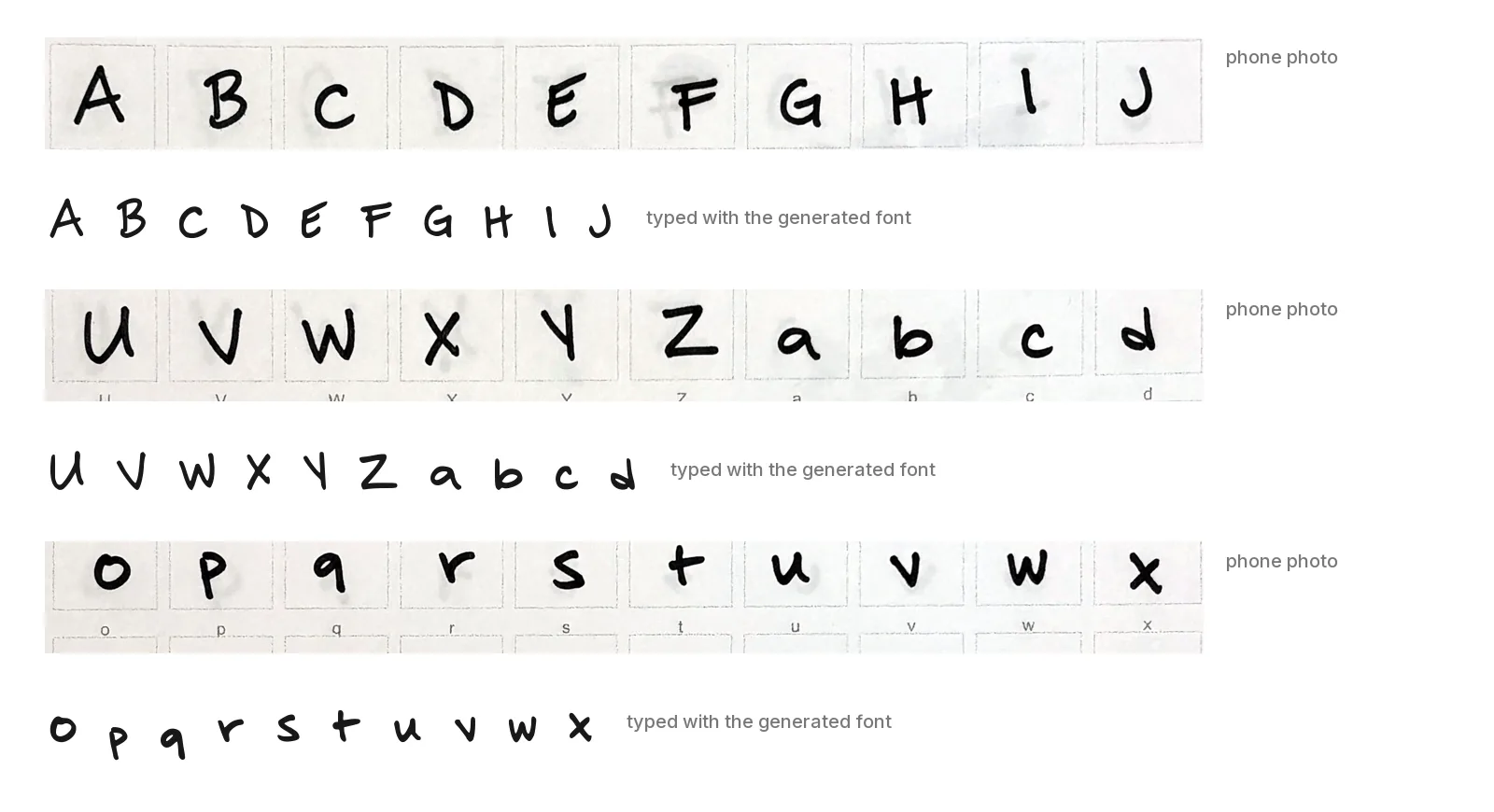
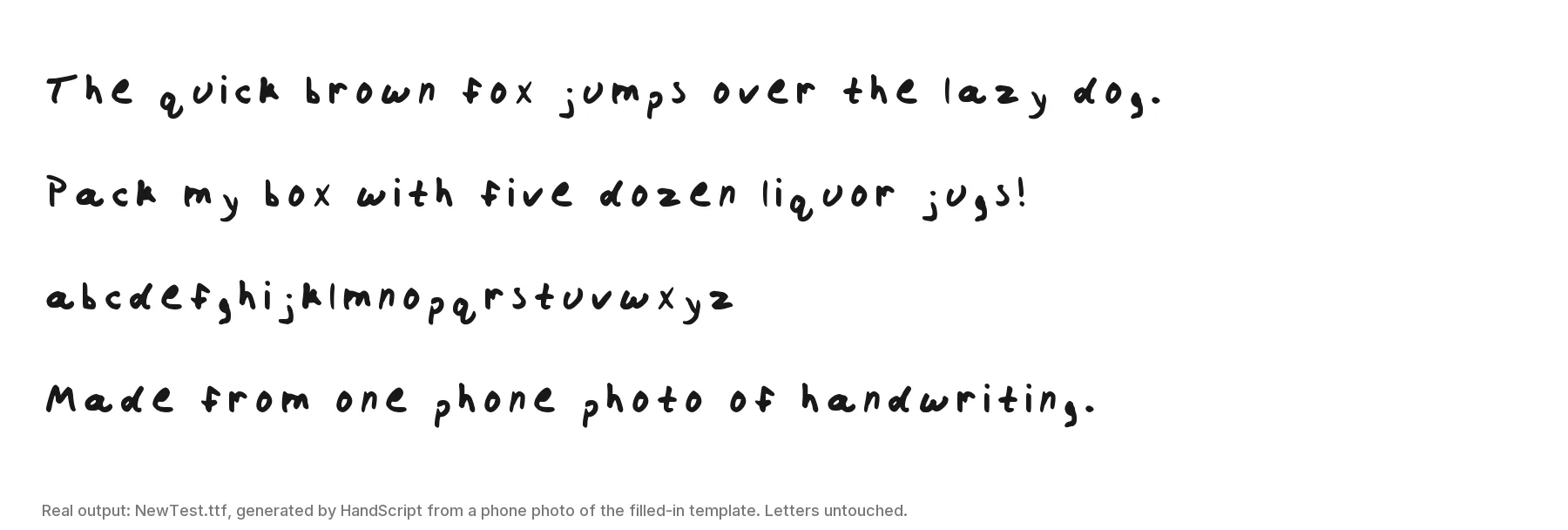
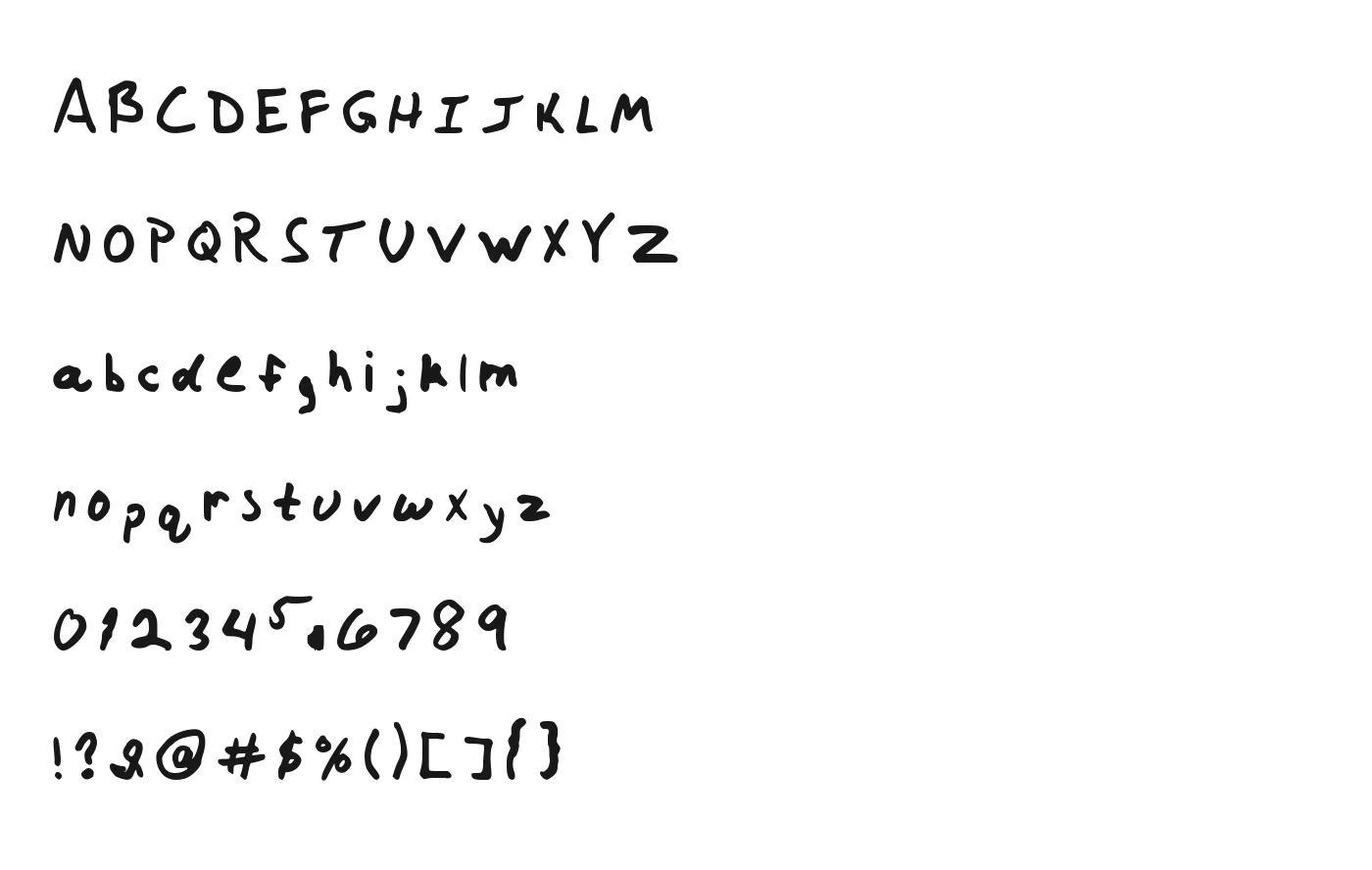
Everything below was typed with a font made from one phone photo of a second, different test sheet — every character on it came through as written, digits and punctuation included. It's the same pipeline you'll use.
What you see after upload
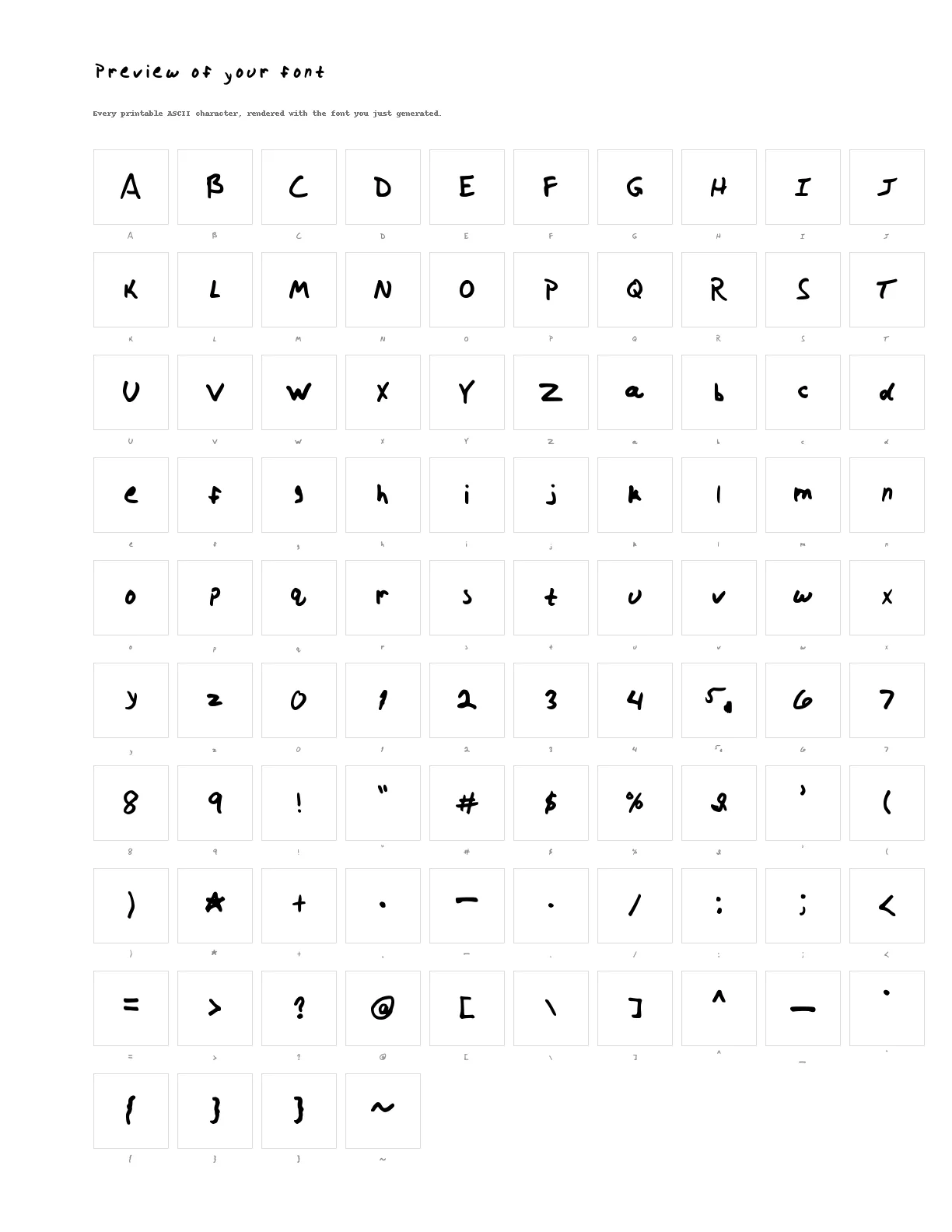
HandScript renders a preview sheet — the same 10×10 grid as the template, but with every cell you wrote typeset in your new font — so you can check each character against what you wrote before paying anything. If a letter came out wrong, reshoot or rewrite that sheet and upload again; making fonts is free.
What you need before you start
What you need, and what to expect.
A printer and one sheet of paper
Any home printer and plain white US Letter paper.
A thick black marker
A Sharpie or similar. It's the biggest single thing you control: thin pens make skinny, faint fonts; a marker gives clean, confident strokes that trace well.
A phone camera
No scanner needed. A normal phone photo of the flat sheet is what the pipeline is built for.
About ten minutes
Writing 94 characters takes most of it (the space is free). If a letter comes out wrong, redo that sheet and upload again.
How HandScript turns a photo into glyphs
The short version of what happens after you upload — so you know what the photo needs to contain and why a marker beats a ballpoint.
Find the corners
An AI vision model (Anthropic's Claude) is shown the four corner regions of your photo and asked to locate the black registration squares — for template fonts, that's the only thing the model is asked to do.
Straighten the page
Using those four points, the photo is perspective-corrected so the page becomes a flat rectangle and every box sits at a known position.
Cut out each written cell
Everything outside the boxes — labels, header, footer, corner marks — is painted white, then each box is cropped. The pale box borders drop out at the black-and-white step, so only your ink remains.
Keep the ink
Each crop is thresholded to black and white and cleaned to the main stroke(s). A thick marker survives this step cleanly; a thin pen can break into fragments.
Trace to vectors
Each cleaned glyph is traced into smooth vector outlines (with potrace). Bumpy edges here come straight from the paper.
Assemble the font
The outlines are sized in proportion to how big you wrote each character (with a minimum per character class), placed on a shared baseline, and written out with FontForge as TTF, OTF and WOFF2. A separate step then typesets the preview sheet with the new font.
Pricing
Free to make and preview. $9 one-time per font to download the TTF, OTF and WOFF2.
No subscription
Paid once per font. Nothing renews, and you only pay once you've seen the preview.
14-day full refund
If your font didn't come out the way you hoped, email us within 14 days and we refund the $9 — no need to justify it. Refund policy
Secure checkout by Stripe
Your card details go straight to Stripe. They never touch our servers.
Your handwriting stays yours
You keep the rights to your handwriting and your photos. We never sell your data or use it for advertising; your uploads are private to your account, handled only by the processors named in our privacy policy, and deleted on request. Privacy
Questions people ask before making a font
Is HandScript free?
Creating an account, making a font and previewing it are free. Downloading the font files (TTF, OTF and WOFF2) is $9 per font, paid once — there is no subscription and nothing renews. If it didn't come out the way you hoped, email us within 14 days for a full refund. Pricing and refunds
What file formats do I get, and where do they work?
Every font comes as TTF (install on Mac, Windows and Linux), OTF (same glyphs, OpenType container) and WOFF2 (for websites via @font-face). Once installed, the font shows up in Word, Pages, Photoshop, Illustrator, Cricut Design Space on desktop, and anything else that lists your system fonts.
Canva only lets paid plans (Pro, Teams, Education, Nonprofit) upload your own fonts to a Brand Kit — upload the TTF or OTF. Procreate imports TTF/OTF directly. On iPhone and iPad you install fonts through a font-installer app; on Android it depends on the phone maker.
Which characters are included?
The 95 printable ASCII characters: A–Z, a–z, 0–9, punctuation and symbols, plus the space. That covers everyday English text. Accented letters, other alphabets and emoji are not captured yet — if you type one, the app you're using will fall back to another font for that character.
Will it join my letters like cursive?
No. You write one character per box, so the font reproduces each letter the way you wrote it but doesn't connect them. The result looks like careful print handwriting, not flowing cursive. Letters that touch or overlap the box borders can also come out clipped, so leave a little space. If what you want is your name and sign-off in your own writing, see turn your signature into a font.
What makes a good sample?
A thick black marker (a Sharpie is ideal), plain white paper, one character centred in each box, and loops fully closed — an open “o” becomes a “u”. Thin ballpoint or gel pens produce skinny strokes that look faint once the font is on screen.
For the photo: lay the sheet flat, shoot square-on from above in even light with no shadow across the page, and keep all four corner squares in frame. Any phone camera is fine; JPEG, PNG and WEBP photos up to 25 MB are accepted.
Do I own the font? Can I use it commercially?
You keep the rights to your handwriting and to the photos you upload. A purchased font is licensed for personal projects — documents, cards, invitations, personal websites and similar. For commercial use (products for sale, logos, client work), email us first. Terms and license
What happens to my photo?
Your photo is stored privately in your account, alongside the font it produced, so you can come back and download it later. The four corner regions of the photo are sent to Anthropic's Claude API — a few small requests, occasionally retried with a second model — to locate the registration marks; by default, Anthropic doesn't use API inputs or outputs to train its models, and we never opt in. We never sell your data or use it for advertising; the only third parties that process your uploads and account data are the processors named in our privacy policy. Email support@handscript.app from your account's address and we delete your account, uploads and fonts (the payment records we're required to keep for tax purposes stay with Stripe). Privacy
Can I make a font from someone else’s handwriting — a parent’s old letters, for example?
Only upload handwriting that is yours or that you have the right to use, such as a family member's letters with the family's permission. Old letters and cards don't come on our template, so they need a separate memorial process that finds each character in the photos and lets you pick the best example of each. That process isn't open yet — see preserve a loved one's handwritingand join the waitlist there; we'll email you when it is.
Can I do all of this from my phone?
Yes. You still need a printer for the one-page template, but writing, photographing and uploading all work from a phone browser. Installing the finished font system-wide on a phone is the fiddly part: iPhone and iPad need a font-installer app, and on Android it depends on the manufacturer (some need a font-manager app, some don't allow it) — though the TTF still works in Android apps that let you import fonts.
How is this different from a “handwriting font generator”?
Most “handwriting font generator” sites either restyle typed text with a pre-made handwriting font or output look-alike Unicode characters you copy and paste. Neither contains your strokes. HandScript is a handwriting font maker in the literal sense: each letter you wrote is traced into vector outlines and assembled into standard TrueType/OpenType files, so it scales cleanly, installs like any other font and works anywhere a normal font does. It is not an image, a keyboard sticker or copy-paste text.
A font from a loved one's letters
Old letters, recipe cards, the note in a birthday card. We're building a way to turn photos of them into a font you can type with. It isn't open yet — the page explains how it will work, what it can't promise, and has the waitlist.
Preserve a loved one's handwriting →